Optimise Your Success: Must-Have Tools for OnlyFans Creators
- The core stack is five tools: Infloww for chat and analytics, Lightroom for photos, CapCut for video, Notion for planning, Google Drive for the archive. The content and planning half of that runs under €30 a month; Infloww is quoted per account and sits on top.
- One Lightroom preset saves one to two hours per shoot. Build it once, save it as an .xmp file, batch it over every future set. The side effect matters more than the saved hours: the look becomes recognisable.
- From the second chat shift onwards, a shared board stops being optional. Without Notion or something like it, information falls through the handover between chatters and the team stops scaling no matter how many people are on the payroll.
- Six numbers per creator, reviewed weekly: response time under 60 seconds, mass-message unlock rate, spend per paying fan around $30-40, the top-1% revenue share (roughly 15% in the accounts we manage), re-sub rate, and fan-to-whale conversion.
Most OnlyFans tool lists are marketing fog. We manage over 20 creators and we have run both the expensive pro suites and the free apps in daily production. This article is the stack that has actually stuck internally at MAHO, plus the shortcuts we would have built in for you if we were the ones running your account.
Why does the tool stack make the difference?
Tools do not replace work, they multiply existing work. An average chatter does not turn into a top chatter because of better software. But a top chatter without an Infloww dashboard cannot see their own mistakes and burns revenue without noticing. Three reasons we put tools in front of our teams:
- Time leverage. A Lightroom batch edit beats running 20 photos through Instagram filters. A CapCut preset beats manual cutting on every clip.
- Visibility leverage. Infloww gives you live response time, unlock rate and fan spend. Without it you are chatting blind.
- Team leverage. A shared Notion board or Google Drive gives you clean handovers between 3 chat shifts. Without that, you do not have a scalable team, no matter how many people are on the payroll.
Which tools do you need for photo and video?
Lightroom for photos and CapCut for video covers it for almost every account we run. Photo editing and video cutting are the difference between "well-meant phone content" and "content that performs on PPV". Our stack recommendations without the marketing talk:
| Tool | Used for | Cost |
|---|---|---|
| Adobe Lightroom | Photo retouching, colour grading, batch editing with presets. Build the preset once, push a hundred photos through in five minutes | free (basic) / €11.89 per month (Cloud + healing brush) |
| FaceApp | AI-based face retouching, makeup, style presets. Handy for quick fixes on the go | €7 per month / €35 per year |
| CapCut | Video cutting, transitions, captions, TikTok-optimised. Our default for everything that is not long-form | free |
| InShot | Video + photo, simpler than CapCut, good for creators who only need short clips | €3.99 per month / €17.99 per year |
Practical tip from our workflow: Set up one Lightroom preset (exposure, colour cast, skin tones), save it as an .xmp file, and batch-apply it across every future shoot. That saves 1-2 hours per shoot and gives you a consistent visual signature, which is its own revenue lever because fans recognise the "look".
What do you use for planning and team organisation?
Notion as the brain, Google Drive as the archive, and a Google Sheet for the weekly numbers. The moment you move past two chat shifts a day or a content team of more than two people, any account without a planning tool falls apart. The base combination we roll out everywhere:
| Tool | Used for | Cost |
|---|---|---|
| Notion | Content calendar, shot lists, chat briefings, whale CRM. The central brain for every account we manage | free (solo), team plan from $8 per user / month |
| Google Drive | Content archive, handover between creator and team. We use a fixed folder structure per creator | 15 GB free, 100 GB from €1.99 per month |
| Google Sheets | PPV stats tracking, posting calendar, weekly KPI review. Low-tech alternative for small setups | free |

Which social channels actually bring subs?
Instagram by a wide margin, then TikTok, Reddit and X in the 10-20% range each. OnlyFans has almost no organic reach of its own, so traffic has to come from outside. The four main channels, ranked by real contribution across our portfolio:
- Instagram (instagram.com): soft account, Reels plus Stories, Linktree funnel. Around 60% of new subs on our launches come from here.
- TikTok (tiktok.com): hook reels, POV clips, transformation content. No explicit material, the trick sits in the hook in the first 3 seconds. Typically 10-20% of new subs.
- Reddit: niche subreddits, 1-3 posts per day, direct captions. Medium effort, solid conversion. Usually 10-20% of new subs.
- Twitter / X: explicit teasers, thread retweets, engagement pods. Low effort, a supporting channel in the 10-20% range.
Running three of these channels in parallel brings in considerably more than running one, because fans normally need two or three touchpoints before they subscribe. We are not going to put a multiplier on it — it depends entirely on which three channels and how consistently they run.
What do we track weekly per creator?
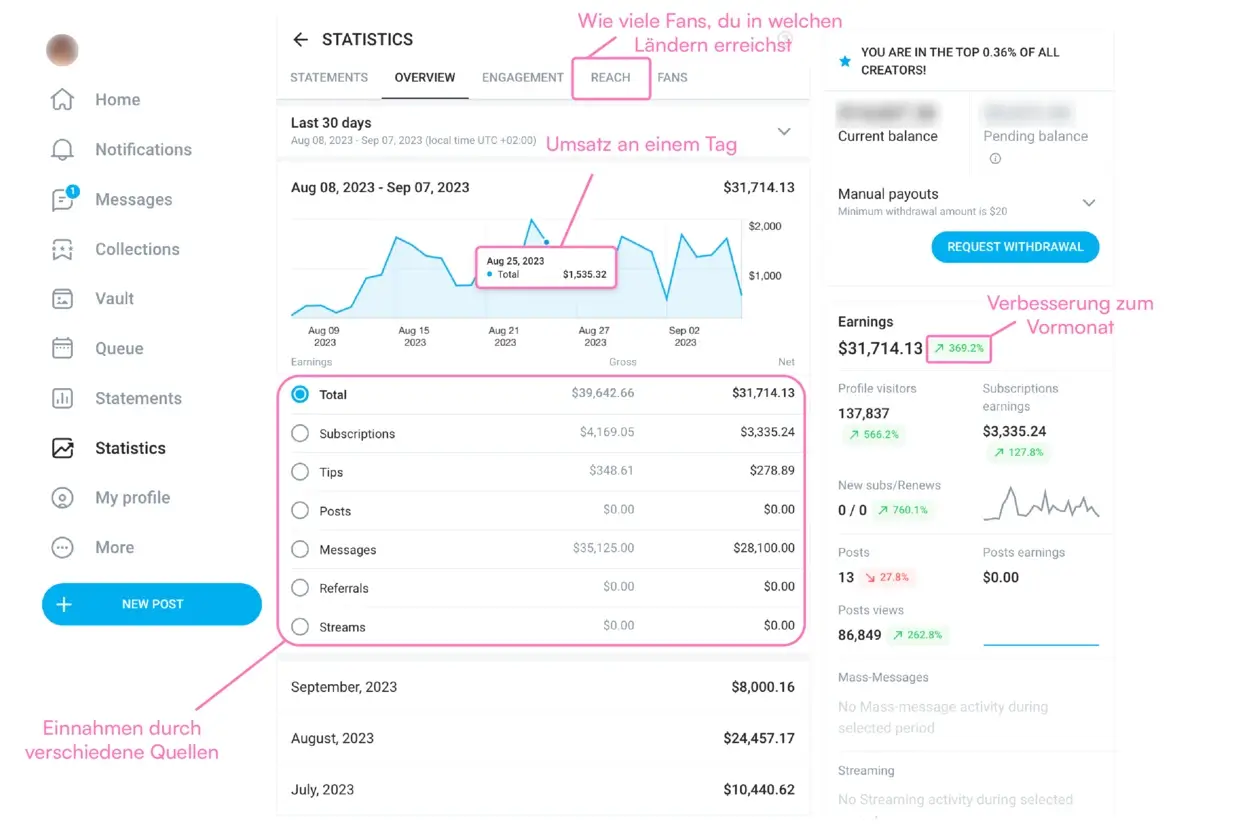
Six numbers, every week: average response time (target under 60 seconds), mass-message unlock rate, average spend per paying fan (target $30-40), the revenue share coming from the top 1% of fans (roughly 15% in the accounts we manage), re-sub rate and fan-to-whale conversion. OnlyFans' own statistics are a starting point for that, but not enough for professional management, so we pull the raw data from Infloww into our own dashboards.
Tool Selection: 5 Questions to Answer First
- Does the tool replace a process or add one? Only tools that make existing work more efficient are a real lever. Tools that create new work eat time instead of saving it.
- Is there a free tier that covers 90% of the features? Usually yes. Pro subscriptions only pay off once you hit a measurable bottleneck.
- Can the tool be shared across the team? Mandatory from shift 2 onwards, otherwise you lose information between chatters.
- Does the tool store sensitive data? If yes: 2FA, strong passwords, no storing credentials in the browser.
- Can I be up and running on the basic version in 10 minutes? If not, the learning curve is usually too high for the use case.
Conclusion: The Tool Stack Decides Scalability
A solo creator can get to maybe $5,000 per month with an iPhone, an Instagram filter and a notes app. Past that, the workload splits across multiple people, multiple channels and multiple content types, and without a solid tool stack the whole system cracks. Our starter recommendation: Lightroom plus CapCut for content, Notion plus Google Drive for planning, Infloww for chat and analytics. The content and planning tools come to under €30 a month between them, which is the figure most creators are asking about; Infloww is quoted per account and is the one line item that scales with the size of the chat desk. The same stack carried the account behind our documented $352,000 top month.
What actually moves an account forward is not the tool choice itself, it is the discipline of using the stack every day. With our MAHO Management service you get the tools, the workflow and the team as one package, so you can focus on the content.

Lukas helps creators grow successfully on OnlyFans.
YouTube